
Dear Valued Customer,
To close / cancel / delete your Epay account, please follow the steps below.
Log in to your Epay account — go to [Account Settings — Security Center] — click [Other — Account Management] — go to [check] — click [Cancel Account]
Personal Account
1. From the e-mail address you used to register with Epay, send a message to service@epay.com :
- Epay account (registered e-mail or customer ID)
- Account balance (must be zero; any remaining balance will be treated as forfeited)
- Reason for closure
- Front and back images of your ID document (must match the file previously verified by the system)
- A handheld photo of yourself holding the ID (both face and document must be clearly visible
-Take a selfie of the cancellation statement in hand (please download the attachment and fill it out)
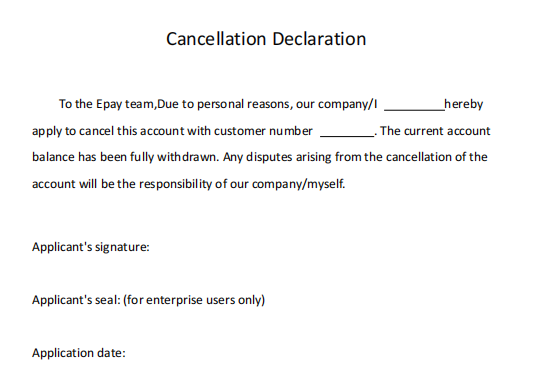
Please state your reason for closure in detail:
- No longer need payment-collection or other services
- Required currency / payment method unavailable
- Fees too high
- Need to close multiple accounts
- Unable to provide required verification documents
- Platform too difficult to use
- Other (please specify)
Corporate Account – additional requirements
- Clear, color photo of a director / beneficial owner holding the ID (face and document must be visible)
- Company incorporation certificate (must match the file previously verified by the system)
2. Permanent restrictions after closure
- Account cannot be reactivated
- The e-mail address cannot be used to register another Epay account
3. Processing time
- Personal account: 1–2 business days
- Corporate account: 2–3 business days
If you encounter any problems during the operation, you can click on "We Are Here" in the bottom right corner of the page to contact online customer service, or send an email to service@epay.com The epayservice@epay.com We will help you solve it!